
IRS Form 8283 Explained: When You Need It and How to Fill It Out
Not tax advice. This article provides general educational information. For advice about your situation, talk with a qualified tax professional. IRS rules can change, and your facts matter.IRS Form 8283 Explained: When You Need It and How to Fill It Out
Many taxpayers get stuck on Form 8283 and with good reason. The name alone (“Noncash Charitable Contributions”) makes it sound intimidating. In reality, it’s a disclosure form: it tells the IRS what you donated and how you determined value when your non-cash deduction crosses certain thresholds.
This guide explains when Form 8283 applies, the difference between Section A and Section B, and the practical steps to complete it accurately.
When Form 8283 is required (common rule)
The IRS instructions say you generally must file Form 8283 if the amount of your deduction for each noncash contribution is more than $500, including groups of similar items over $500.
Source: https://www.irs.gov/pub/irs-pdf/i8283.pdf
Section A vs Section B (big picture)
- Section A is typically used for property with a claimed deduction of more than $500 but not more than $5,000 (for many common situations).
- Section B is generally used when you claim more than $5,000 for a single item or group of similar items, or when special rules apply.
The instructions provide the specific thresholds and special cases.
Source: https://www.irs.gov/instructions/i8283
The “similar items” rule (why it matters)
The IRS treats groups of similar items as one category for threshold purposes. Example:
- “Women’s coats” donated in one year could be considered a group.
This doesn’t mean you can’t donate or deduct. It means:
- track your items consistently
- watch the totals
- prepare Form 8283 when required
Special rule: clothing/household items not in good used condition
IRS guidance notes special rules for clothing/household items that are not in good used condition; a qualified appraisal and Section B may be required in certain cases when claiming more than $500 for a single item.
Sources:
- Pub. 561: https://www.irs.gov/publications/p561
- Form 8283 instructions: https://www.irs.gov/instructions/i8283
How to fill out Form 8283 (practical approach)
Always use the current year’s IRS instructions and your tax software prompts.
Step 1: Gather your donation details
For each applicable non-cash item/group:
- charity name and address
- date acquired and date donated (as applicable)
- description (be specific)
- how you determined FMV
Step 2: Confirm which section applies
Use the thresholds in the instructions and pay attention to “similar items.”
Step 3: Enter the information consistently
Your goal is clarity:
- Avoid vague descriptions
- Match your internal records to the form entries
Step 4: If Section B applies, plan for appraisal rules
If a qualified appraisal is required, the appraisal must meet IRS standards. This is where you should consult a professional if you’re unsure.
Common mistakes
- Forgetting Form 8283 when non-cash totals exceed thresholds
- Treating groups of similar items as separate to avoid thresholds
- Using weak descriptions
- Claiming values for items not in good used condition
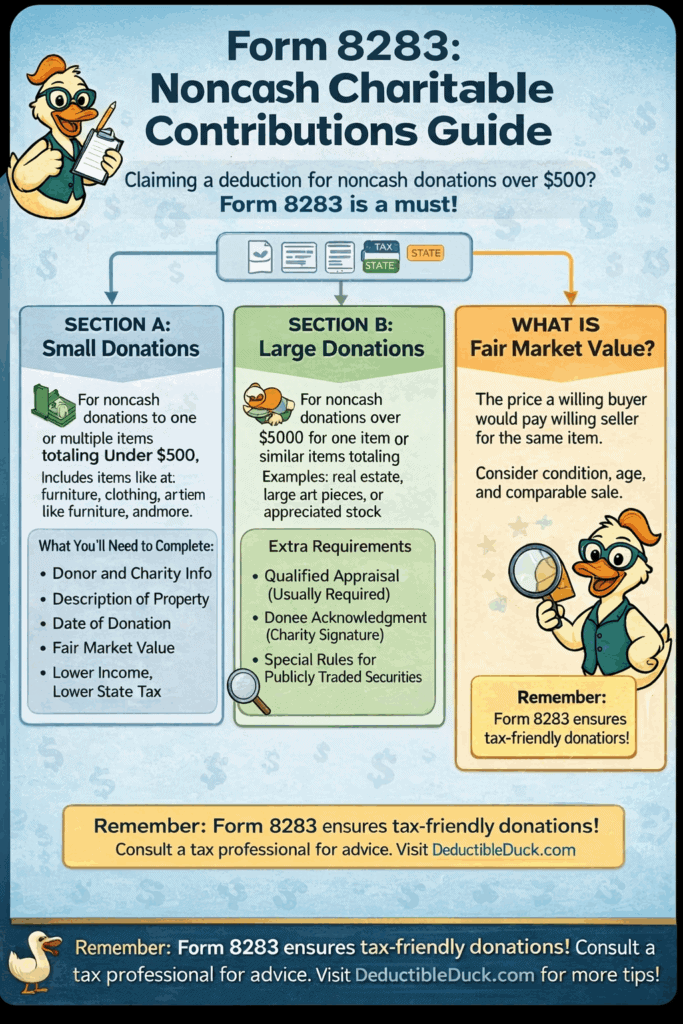
Here’s an infographic summarizing things so far:
How Deductible Duck helps
A tracker doesn’t “file the form for you,” but it helps you:
- keep a clean list of non-cash donations
- see yearly totals early
- export your entries in an organized way
- reduce last-minute errors
- provides you pre-filled worksheets to help fill out your Form 8283 inside your tax software
- gives you PDF reports that your CPA just needs to include with your return to substantiate your donations
Next reads
- Non-cash rules: IRS Non-Cash Donation Rules
- Understanding valuation: The Basics of Fair Market Value
- Audit-safe records: Keeping Audit-Safe Records
Start Tracking Your Donations Now
Enter those valuable donations year-round and export an IRS-friendly report when you’re ready to file, just like ItsDeductible. Only $29.99/year