
Personal Info is where you update your tax information so Deductible Duck can accurately calculate your estimated tax savings.
What You’ll See
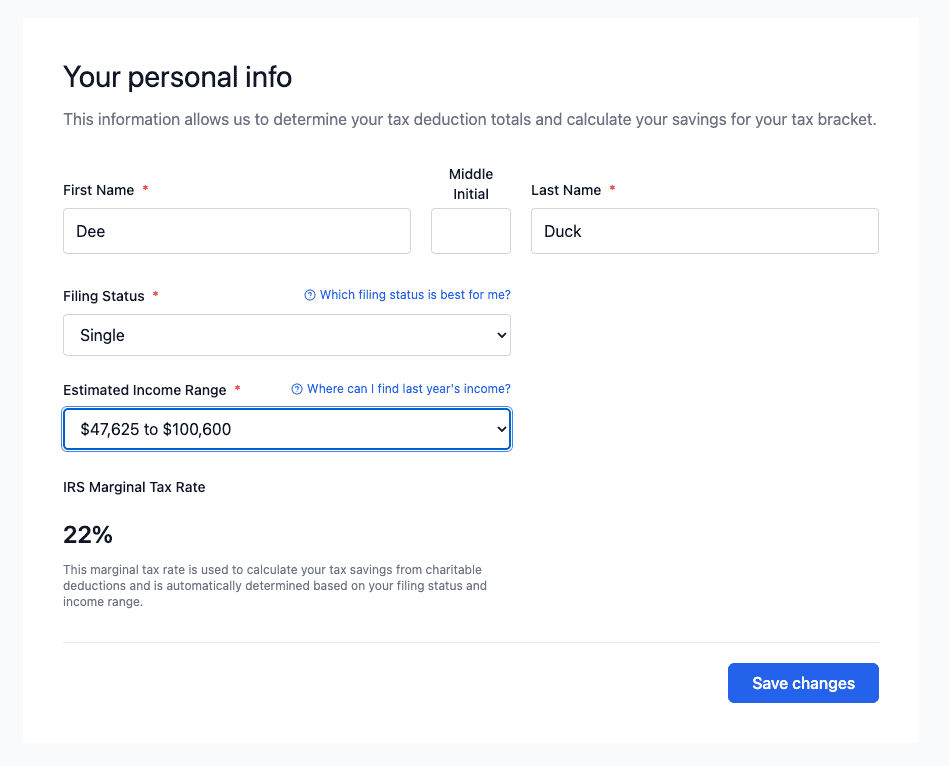
When you click Personal Info in the left sidebar, you will see a form with the following fields:
- First Name – Your first name (required)
- Middle Initial – Your middle initial (optional)
- Last Name – Your last name (required)
- Filing Status – Your tax filing status (required)
- Estimated Income Range – Your annual income range (required)
- IRS Marginal Tax Rate – Calculated automatically based on your filing status and income
How to Update Your Personal Info
Step 1: Fill in Your Name
- Click in the First Name field and enter your first name.
- If you have a middle initial, click in the Middle Initial field and enter it.
- Click in the Last Name field and enter your last name.
ℹ️ Tip: Use the name exactly as it appears on your tax return for accuracy.
Step 2: Choose Your Filing Status
- Click the Filing Status dropdown.
- Select your status from the list:
- Single
- Married Filing Jointly
- Married Filing Separately
- Head of Household
- Qualifying Widow(er)
ℹ️ Help: If you’re unsure which status applies to you, click “Which filing status is best for me?” for more information.
Step 3: Enter Your Income Range
- Click the Estimated Income Range dropdown.
- Select the range that matches your annual income.
ℹ️ Help: If you’re unsure about your income, click “Where can I find last year’s income?” for guidance.
Step 4: Review Your Tax Rate
Your IRS Marginal Tax Rate will be calculated automatically and displayed on the screen. This is the tax bracket that applies to your income and filing status.
⚠️ Important: This rate is used to estimate your tax savings. For your actual tax return, confirm this rate with your tax professional.
Step 5: Save Your Changes
- Review all the information you have entered.
- Click the blue Save Changes button at the bottom right.
- You will see a confirmation message.
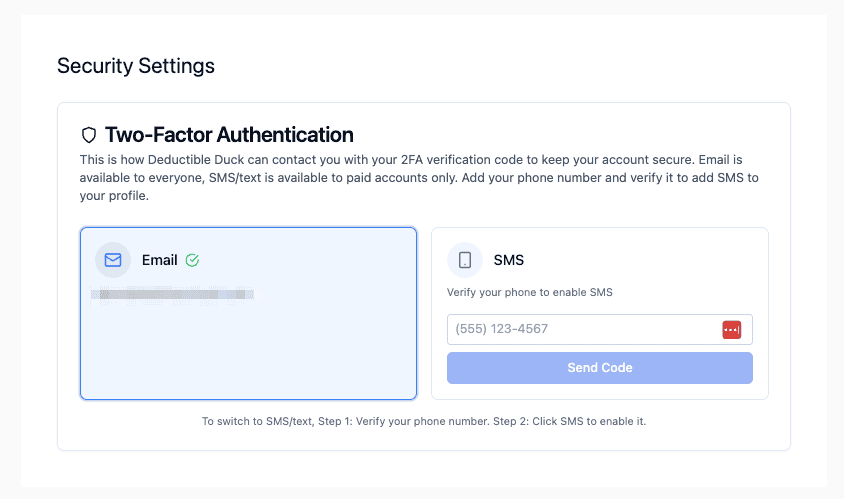
You can also change your Two Factor Authentication (2FA) method at the bottom of the screen:
Why This Matters
The information on this screen helps Deductible Duck calculate how much money your donations might save you on taxes. The app uses:
- Your filing status to determine your tax bracket
- Your income range to estimate your marginal tax rate
- Both together to calculate estimated tax savings
ℹ️ Reminder: Estimated savings are estimates only. Always confirm with your tax professional or tax software before filing.
Going Back
To return to the main Dashboard, click Home in the left sidebar.