
Mileage is where you track miles you drive for charitable purposes. Instead of donating money or items, you’re donating your time and vehicle use to help charities. The IRS allows you to deduct the mileage at a set rate per mile.
What You’ll See
When you click View next to Mileage on the Dashboard, you will see:
- A search box – Find donations by charity name
- Column headers – Sort by Charity, Donation Date, Miles, or Estimated Savings
- List of donations – Each row shows one mileage entry
- Edit/Delete buttons – Modify or remove entries
- Pagination – Navigate through pages if you have many mileage donations
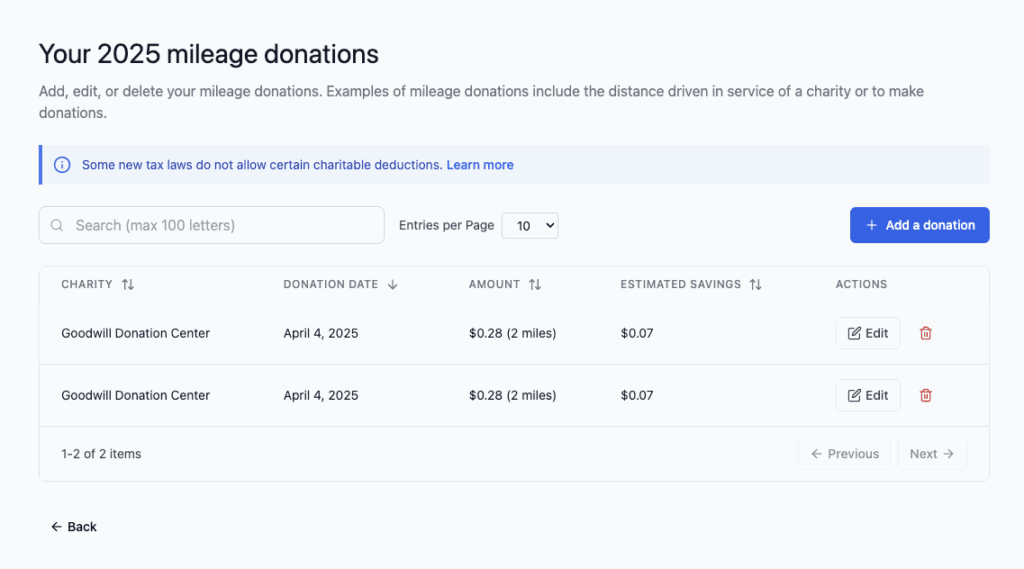
TIP: Each row represents one trip or a group of trips from one date. You can enter multiple trips on the same day or separate them out—whatever works best for your records.
Understanding the Columns
Charity
The name of the organization you drove for.
Examples:
- Local food bank (delivering food)
- Animal shelter (picking up supplies)
- Hospital volunteer program (driving patients)
- Youth organization (transporting supplies)
Donation Date
The date you drove for the charity (month, day, year format).
Important: If you drove multiple times, you can:
- Enter each trip on its actual date, OR
- Group multiple trips from one month and enter them as one entry with the total miles
⚠️ IMPORTANT: Make sure the date is in the correct tax year. Mileage must be claimed in the year you drove it.
Amount (Miles Driven)
The total miles you drove on this trip (or for multiple trips if you’re grouping them).
Examples:
- 2 miles (short trip)
- 47 miles (longer trip)
- 156 miles (multiple trips combined)
Estimated Savings
Based on your tax bracket, this shows approximately how much you could save on taxes from this mileage deduction.
The calculation is: Miles × Current IRS Rate × Your Tax Bracket
⚠️ IMPORTANT: This is an estimate only. Your actual tax savings depend on your final tax situation.
Understanding IRS Mileage Rates
What is the Mileage Rate?
The IRS sets a standard rate per mile that you can deduct for charitable driving. Each year, this rate may change.
Example: For 2025, the rate might be 14¢ per mile (this is an example—check the IRS website for the current rate).
How It’s Calculated
Deductible Duck automatically applies the current IRS rate. You just enter the miles, and the app calculates the value:
Miles Driven × IRS Rate per Mile = Deductible Value
Example:
- You drove 50 miles for charity
- IRS rate is 14¢ per mile
- Deductible value = 50 × $0.14 = $7.00
Finding the Current Rate
The IRS publishes the charitable mileage rate each year:
- Visit www.irs.gov
- Search for “mileage rates”
- Look for the “charitable” rate (not the business or medical rates)
TIP: Deductible Duck should have the current rate built in. If you think the rate is wrong, check the IRS website and contact support.
What Counts as Charitable Mileage?
Drives You CAN Claim
✓ Volunteer work at a charity (driving TO the volunteer location)
✓ Picking up or delivering donation items
✓ Attending a charity board meeting or event
✓ Picking up donated items from a person’s home
✓ Transporting supplies for a charity event
✓ Driving patients for a medical clinic or hospital volunteer program
✓ Driving for a youth organization (coaching, tutoring, mentoring)
✓ Driving for environmental cleanup or conservation work
Drives You CANNOT Claim
✗ Commuting to a regular job (even if it’s at a charity)
✗ Driving for personal errands, even if you donate the savings
✗ Carpooling friends to a charity event for your own benefit
✗ Driving to church for regular services (unless you have a specific volunteer duty)
✗ Driving your own family to events
⚠️ IMPORTANT: You must be performing a service for the charity, not just attending an event. Passive attendance doesn’t count.
Managing Your Mileage Donations
Editing an Entry
If you need to change information (miles, date, charity):
- Find the entry in the list
- Click the Edit button (pencil icon)
- Update the information
- Click Save Changes
Deleting an Entry
If you entered mileage by mistake:
- Find the entry in the list
- Click the Delete button (trash icon)
- Confirm you want to delete it
⚠️ WARNING: Deletion cannot be undone.
Searching for Mileage
To find trips to a specific charity:
- Click in the Search box
- Type the charity name
- The list filters to show only that charity’s mileage
How to Add Mileage
From the Dashboard
- Click Add a donation button
- Select Mileage from the dropdown
- Fill in the form (see details below)
Directly from Mileage Category
- On the Dashboard, find Mileage
- Click Add
- The mileage form opens
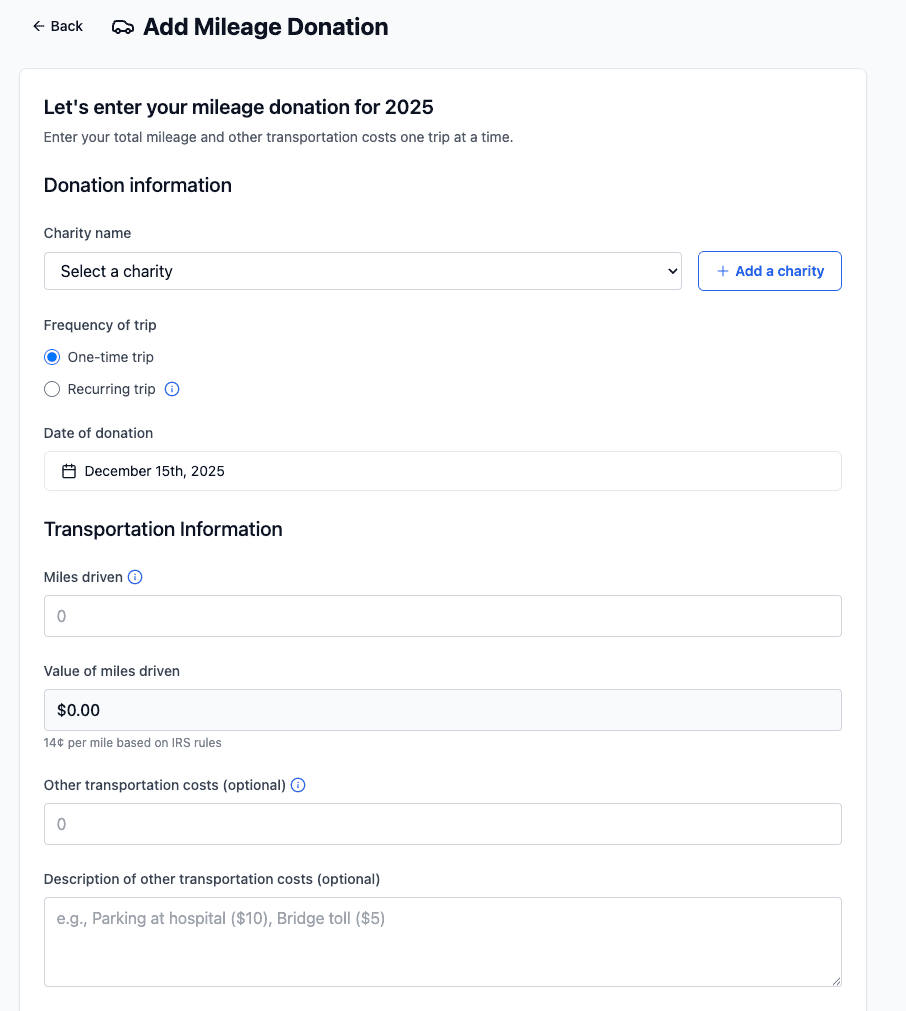
The Mileage Form – What to Fill In
Donation Information Section
Charity name (required)
- Click the dropdown or start typing to select a charity
- If your charity isn’t listed, click “Add a charity” to create it
Frequency of trip (required)
- One-time trip – A single drive
- Recurring trip – Regular drives (weekly, monthly, etc.)
- If you select “Recurring,” you’ll see additional options to specify how often
Date of donation (required)
- Click the calendar icon to pick the date
- Or type the date in MM/DD/YYYY format
Transportation Information Section
Miles driven (required)
- Enter the total miles for this trip (or multiple trips if you’re grouping them)
- Just enter the number (e.g., “47” for 47 miles)
Value of miles driven (automatically calculated)
- This field fills automatically based on miles × IRS rate
- Shows something like “$0.28 (2 miles)” or “$6.58 (47 miles)”
- Shows current IRS rate in parentheses
TIP: You can see the exact calculation here. If it doesn’t look right, double-check the miles you entered.
Other transportation costs (optional)
- Parking fees
- Tolls
- Gas (you can claim actual gas instead of mileage, but not both—mileage is usually easier)
Description of other transportation costs (optional)
- Example: “Toll on I-90” or “Parking at hospital”
- Only fill this in if you entered a cost above
Totals Section
Total donation value (automatically calculated)
- Adds miles value + other costs
- This is what you can deduct
Important Tips for Mileage Donations
Keep Detailed Records
The IRS wants to see:
- Date of the drive
- Charity name and location
- Purpose of the drive (volunteer work, picking up items, etc.)
- Miles driven
TIP: Keep a simple log in your car or phone. Record details right away so you don’t forget.
Use the Most Accurate Mileage
- Use your odometer if possible
- Use maps (Google Maps, Apple Maps) to calculate distance if you’re unsure
- Round to the nearest whole mile
One Trip vs. Multiple Trips
You can enter mileage as:
- One entry per trip – Most detailed and easiest to track
- Multiple trips as one entry – Less detailed but faster if you do this regularly
Example: If you volunteer every Saturday, you could either:
- Enter each Saturday as a separate line item, OR
- Add up all Saturdays in a month and enter as one entry
Recommendation: Enter each trip separately so you have clear records if the IRS asks.
Round-Trip vs. One-Way
Enter the TOTAL miles for the round trip (there and back).
Example: If the charity is 25 miles away:
- Don’t just enter 25 miles
- Enter 50 miles (25 there + 25 back)
Document Your Volunteer Work
Keep records showing:
- You were volunteering for a qualified charity
- The specific dates you volunteered
- What you did
This could be:
- A letter from the charity
- Your volunteer schedule
- Emails confirming your volunteer shifts
- Photos of you volunteering
⚠️ IMPORTANT: If the IRS questions your mileage, you’ll need to prove you actually volunteered.
Common Scenarios
Scenario 1: Weekly Volunteering
You volunteer at a food bank every Saturday. The food bank is 15 miles away (30 miles round trip).
Option A – Enter Each Week:
- January 4: 30 miles
- January 11: 30 miles
- January 18: 30 miles
- (and so on)
Option B – Enter Monthly:
- January: 4 trips × 30 miles = 120 miles (total for the month)
Both are acceptable. Choose whichever works for your record-keeping.
Scenario 2: Picking Up Donation Items
You drive across town to pick up furniture someone is donating to Goodwill.
- Distance from your home: 8 miles
- Distance from donation location to Goodwill: 6 miles
- Distance from Goodwill back home: 14 miles
- Total: 28 miles
Enter 28 miles (not just the 8-mile trip to pick it up).
Scenario 3: Driving Supplies for an Event
You drive from home to pick up event supplies at a warehouse, then to the event location, then home.
- Home to warehouse: 5 miles
- Warehouse to event: 12 miles
- Event to home: 17 miles
- Total: 34 miles
Enter 34 miles for this trip.
Frequently Asked Questions
Q: Can I claim mileage if I’m paid by the charity?
A: No. If the charity pays you (even a small amount), you can’t claim the mileage deduction. You can either claim the mileage OR the pay, but not both.
Q: Can I claim mileage for driving my children to a charity event?
A: Only if you have a specific volunteer role. Simply attending an event (even if your kids benefit) doesn’t count.
Q: What if I made multiple stops on one drive?
A: Add up all the miles from all the stops. That’s your total mileage for that trip.
Q: Can I claim parking and tolls?
A: Yes! You can claim actual parking and toll costs in addition to mileage. Just enter them in the “Other transportation costs” field.
Q: Should I claim mileage or actual gas costs?
A: Claiming the standard mileage rate is almost always better than trying to track actual gas costs. Stick with mileage.
Q: What if I forgot to record some mileage?
A: Do your best to estimate based on:
- Records from the charity
- Your calendar
- Invoices or emails from that time period
- Memory of the time period
Be reasonable and conservative in your estimates.
Troubleshooting
“My math doesn’t match the calculated value”
Check:
- Did you enter the correct number of miles?
- Is the IRS rate shown correct for this year?
- Did you include round-trip mileage?
If something seems wrong, take a screenshot and contact support.
“I can’t find my charity in the list”
- Check the spelling – the charity might be listed differently
- If it’s not there, click “Add a charity” to create a new entry
- Enter the charity name and any other available info
“The value seems too low”
Remember:
- The mileage rate is usually 12-20¢ per mile
- Even 50 miles only equals $7-10 in value
- That’s normal! The real benefit is the tax deduction, not a dollar-for-dollar value
Going Back
To return to the Dashboard, click Home in the left sidebar or click the Back button.
Remember: Keep good records. Mileage deductions are one of the most commonly audited deductions, so having clear documentation is important.