
Stock is where you track donations of securities like individual shares of stock, mutual funds, bonds, or other investments. Donating stock instead of cash can be very tax-efficient!
What You’ll See
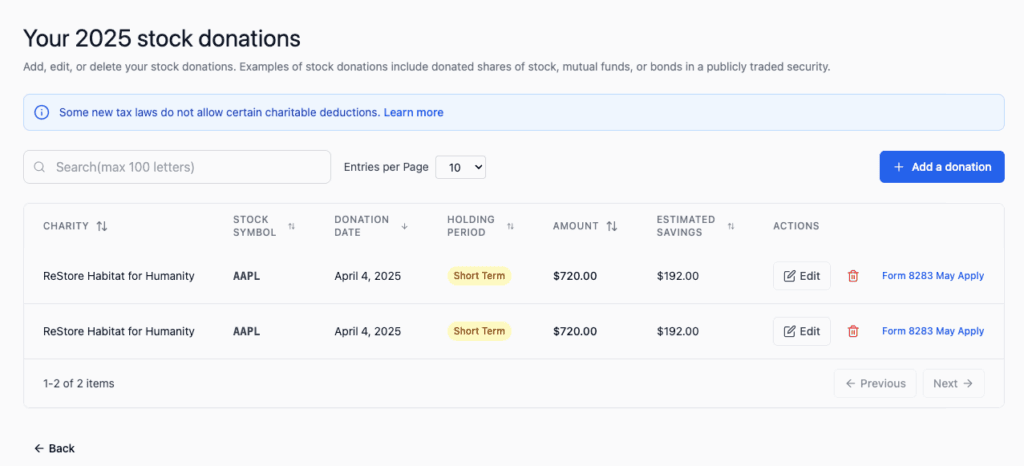
When you click View next to Stock on the Dashboard, you will see:
- A search box – Find donations by charity name
- Column headers – Sort by Charity, Stock Symbol, Donation Date, Amount, or Estimated Savings
- List of donations – Each row shows one stock donation
- Edit/Delete buttons – Modify or remove donations
- Special buttons – Some stocks have “Form 8283 M” buttons for multi-item reporting
Understanding the Columns
Charity
The name of the organization that received your stock donation.
Examples:
- University or college
- Medical research foundation
- Community foundation
- Arts organization
- Environmental nonprofit
Stock Symbol
The ticker symbol for what you donated (for individual stocks).
Examples:
- AAPL (Apple)
- MSFT (Microsoft)
- VTSAX (Vanguard Total Stock Market)
- For mutual funds or bonds, might show the fund name instead
Donation Date
The date the stock was transferred to the charity.
⚠️ IMPORTANT: This is NOT the date you bought the stock. It’s the date the charity received it. This is the date that matters for tax purposes.
Amount
The fair market value of the stock on the donation date.
Example: If you donated 10 shares of a stock worth $50/share on the donation date, the amount is $500.
Estimated Savings
Based on your tax bracket, this shows approximately how much you could save on taxes from this donation.
⚠️ IMPORTANT: This is an estimate only. Your actual tax savings depend on your final tax situation and whether you itemize deductions.
Holding Period (if visible)
Whether you held the stock:
- Short term – Less than one year (deduction may be limited)
- Long term – More than one year (better tax benefit)
Why Donate Stock Instead of Cash?
Donating stock instead of selling it and donating cash can save you significantly. Here’s why:
You Avoid Capital Gains Tax
If you sell the stock yourself:
- You owe capital gains tax on the profit
- That reduces how much you can donate
- You end up with less money to give
If you donate directly:
- NO capital gains tax
- The full amount goes to the charity
- You get a full charitable deduction
Real-World Example
Let’s say you own stock worth $5,000 today that you originally paid $1,000 for:
Scenario A: Sell It Yourself
- Sell stock for $5,000
- Owe capital gains tax: ~$750 (at 15% long-term capital gains rate)
- Money left to donate: $4,250
- Tax deduction you get: $4,250
Scenario B: Donate It Directly
- Donate stock worth $5,000
- Capital gains tax: $0
- Charity receives: $5,000
- Tax deduction you get: $5,000
In this example, donating stock directly saves $750 in taxes AND gives the charity an extra $750!
What Can You Donate?
You CAN Donate
✓ Individual stocks (shares of publicly traded companies)
✓ Mutual fund shares
✓ Exchange-traded funds (ETFs)
✓ Bonds
✓ Treasury securities (T-bills, T-notes, T-bonds)
✓ Some types of cryptocurrency (limited)
You CANNOT Donate
✗ Retirement accounts (401k, IRA, Roth IRA)
✗ Stock options
✗ Restricted stock units (RSUs) that haven’t vested
✗ Penny stocks (usually)
✗ Thinly traded stocks
✗ Company stock subject to restrictions
✗ Stocks in an IRA account (technically you can, but it defeats the tax advantage)
⚠️ IMPORTANT: Only publicly traded securities (stocks that trade on exchanges) qualify for the best tax treatment. Check with your tax advisor for other types of securities.
How to Add a Stock Donation
From the Dashboard
- Click Add a donation button
- Select Stock from the dropdown menu
- Fill in the form (see details below)
Directly from Stock Category
- On the Dashboard, find Stock
- Click Add
- The stock donation form opens
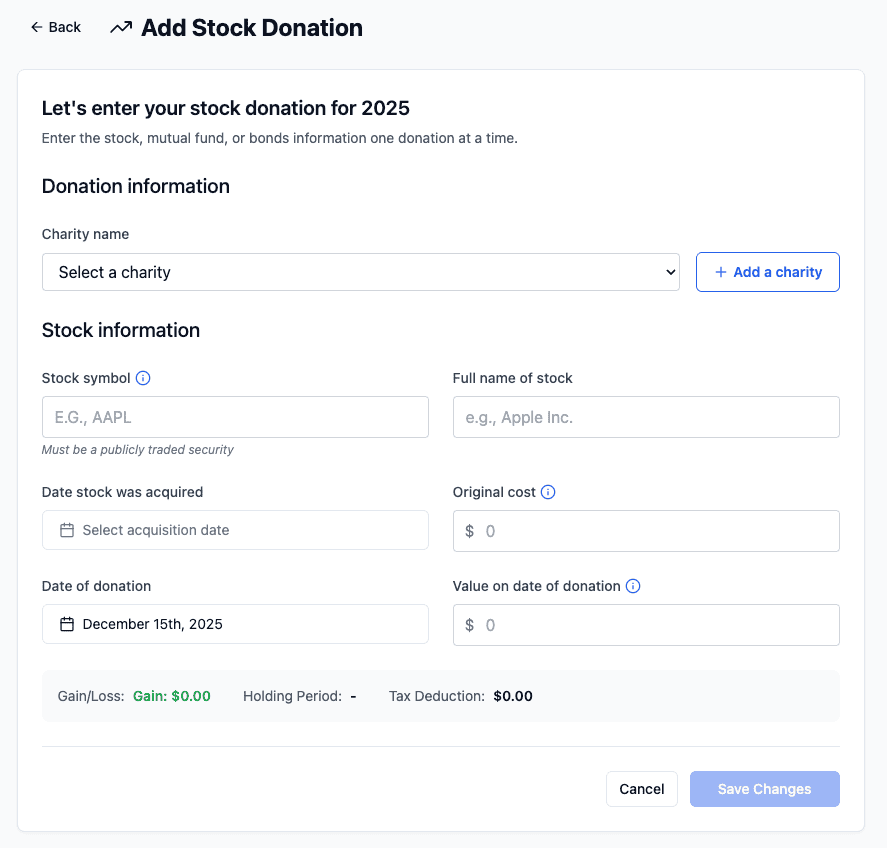
The Stock Donation Form – What to Fill In
Donation Information Section
Charity name (required)
- Click the dropdown or start typing
- If your charity isn’t listed, click “Add a charity” to create it
Stock Information Section
Stock symbol (required)
- The ticker symbol for the stock
- Examples: AAPL, MSFT, VTSAX, BRK.B
- For mutual funds, use the fund ticker
TIP: Not sure of the symbol? Search online “stock symbol for [company name]”
Full name of stock (required)
- The complete name of the company or fund
- Examples:
- “Apple Inc.”
- “Microsoft Corporation”
- “Vanguard Total Stock Market Index Fund”
Date stock was acquired (required)
- When you originally bought the stock
- Click the calendar icon to pick the date
- Format: MM/DD/YYYY
WHY THIS MATTERS: The IRS wants to know if you held it long-term (more than 1 year) or short-term. Long-term donations get better tax treatment.
Original cost of stock (required)
- What you paid for the stock when you bought it
- Just the number (e.g., “2500” for $2,500)
TIP: Check your original purchase confirmation or brokerage statement.
Date of donation (required)
- When you donated the stock to the charity
- Click the calendar icon
- Format: MM/DD/YYYY
⚠️ IMPORTANT: This should be the date the charity received the stock, not the date you initiated the transfer.
Value on date of donation (required)
- The fair market value of the stock on the donation date
- What it was worth when transferred, not what you paid
HOW TO FIND THIS:
- Look up the stock price on the donation date
- Use websites like Yahoo Finance, Google Finance, or your brokerage
- Multiply: Number of shares × Stock price on that date = Value on donation date
Example:
- You donated 10 shares of AAPL
- On the donation date, AAPL was $150/share
- Value on donation date: 10 × $150 = $1,500
Tax Impact Section
The form will show:
Holding Period
- Automatically calculated from acquisition date and donation date
- Shows “Long term” or “Short term”
- Long-term gets better tax treatment
Gain on the stock
- The form calculates this automatically
- Gain = Donation value minus original cost
- Example: $1,500 (donation) – $500 (original cost) = $1,000 gain
- This is the gain you AVOID when you donate instead of sell
Tax Deduction: $[amount]
- Shows the full fair market value on donation date
- This is what you can deduct on your taxes
Important Details About Stock Donations
Fair Market Value (FMV)
This is the key to everything. You deduct the FMV on the donation date, NOT what you paid for it.
How to Find FMV:
- Check your brokerage account on the donation date
- Look up the closing price from that date on financial websites
- Call your broker
Why the Donation Date Matters:
- Stock prices change daily
- A $100 stock on Monday might be $105 on Friday
- The IRS cares about the value on the exact date transferred
- Use closing price from that date
Holding Period – Long-Term vs. Short-Term
Long-Term Holding (MORE than 1 year)
- You held the stock for more than 12 months
- DEDUCTION: Full fair market value
- BEST TAX BENEFIT
Short-Term Holding (1 year or less)
- You held the stock for 12 months or less
- DEDUCTION: Often limited to your basis (cost)
- LESS TAX BENEFIT
TIP: Whenever possible, wait until a stock has been held for more than 1 year before donating. The tax benefit is much better.
Example:
- Bought stock on January 15, 2024 for $1,000
- It’s now worth $3,000
- If you donate on January 14, 2025: SHORT-TERM (only ~$1,000 deduction)
- If you donate on January 16, 2025: LONG-TERM ($3,000 deduction!)
- Waiting one more day saves you ~$600 in tax benefit!
Transferring the Stock to Charity
You don’t just email the stock to the charity! You need to transfer it properly.
Steps to Transfer:
- Contact the charity – Ask for their brokerage transfer instructions
- They should provide account information
- They need to know the stock symbol and share count
- They may need your broker’s name and account number
- Contact your brokerage – Tell them to transfer the shares
- Most brokerages can do this electronically
- It typically takes 3-5 business days
- There may be a small transfer fee ($0-50)
- Ask for confirmation when complete
- Get confirmation – Once transferred
- Your brokerage confirms the transfer
- The charity confirms receipt
- Keep both confirmations for your records
⚠️ IMPORTANT: Don’t just sell the stock and send cash. That’s not a stock donation—it’s a cash donation and you lose the advantage of avoiding capital gains!
Documentation Requirements
The IRS requires documentation for stock donations:
For donations over $500:
- You need Form 8283, Section B (Qualified Appraisal)
- A qualified appraiser must value the stock
- This costs money, but for liquid securities (public stocks), the value is usually clear
For donations under $500:
- You need a statement showing the stock value on donation date
- Charity’s receipt showing what was donated
- Your brokerage confirmation of the transfer
What to Keep:
- Brokerage statement showing the transfer
- Charity’s written acknowledgment of the donation
- Value documentation (price on donation date)
- Form 8283 if donation was over $500
Managing Your Stock Donations
Editing a Donation
If you need to change information:
- Find the donation in the list
- Click the Edit button (pencil icon)
- Update the information
- Click Save Changes
Deleting a Donation
If you entered a stock donation by mistake:
- Find the donation in the list
- Click the Delete button (trash icon)
- Confirm you want to delete it
⚠️ WARNING: Deletion cannot be undone.
Searching for Stock Donations
To find donations of a specific stock:
- Click in the Search box
- Type the charity name or stock symbol
- The list filters to show matching donations
Common Scenarios
Scenario 1: Single Stock Donation
You own 25 shares of Apple. Apple is trading at $190/share. You donate all 25 shares to your university.
What to enter:
- Charity: University name
- Stock symbol: AAPL
- Full name: Apple Inc.
- Date acquired: (when you bought it)
- Original cost: (what you paid for all 25 shares)
- Donation date: (when transferred to university)
- Value on donation date: 25 × $190 = $4,750
Tax deduction: $4,750 (if long-term holding)
Scenario 2: Mutual Fund Donation
You own shares in a Vanguard Index Fund. You have $8,000 worth. You donate them to your favorite charity.
What to enter:
- Charity: (your favorite charity name)
- Stock symbol: VTSAX (or whatever the fund is)
- Full name: Vanguard Total Stock Market Index Fund
- Date acquired: (when you bought the shares)
- Original cost: (what you paid originally)
- Donation date: (when transferred to charity)
- Value on donation date: $8,000
Tax deduction: $8,000 (assuming long-term holding)
Scenario 3: Multiple Donations, One Stock
You own 100 shares of Microsoft. Over 2 years, you donate 20 shares at a time to different charities.
You would enter 5 separate stock donations:
- Donation 1: 20 shares MSFT to Charity A (Date 1)
- Donation 2: 20 shares MSFT to Charity B (Date 2)
- Donation 3: 20 shares MSFT to Charity A (Date 3)
- Donation 4: 20 shares MSFT to Charity C (Date 4)
- Donation 5: 20 shares MSFT to Charity B (Date 5)
Each donation is a separate entry with its own value on that donation date.
Tax Tips for Stock Donations
Tip 1: Time Donations for Long-Term Status
If stock will become long-term soon:
- Wait until it qualifies for long-term treatment
- The tax deduction increase is usually worth the wait
- Stock prices fluctuate anyway
Tip 2: Donate Appreciated Stock to Charity
Don’t donate stocks that have LOST value:
- Donate stock you’ve made money on
- If you have stock that lost value, sell it for a tax loss
- Keep the loss for your taxes
- Then donate appreciated stock
EXAMPLE: You have Stock A (up $5,000) and Stock B (down $2,000)
- Donate Stock A ($5,000 deduction, avoid capital gains)
- Sell Stock B (take $2,000 capital loss)
- Better overall tax result!
Tip 3: Bundle Donations
If you have multiple small stock donations:
- You might group them into one larger donation
- This can help with IRS Form 8283 requirements
- But keep detailed records of each stock
Tip 4: Save Your Valuations
Keep a record of stock prices on:
- The day you acquired the stock
- The day you donated the stock
- This documentation is valuable for taxes
Tip 5: Coordinate with Your Tax Preparer
Before donating stock:
- Talk to your tax preparer
- They can advise on timing
- They can explain the impact on your taxes
- They need the information anyway for your return
Frequently Asked Questions
Q: What’s the difference between donating stock and donating cash?
A: When you donate stock, the charity gets the full value you’re deducting AND you avoid capital gains tax. It’s usually more tax-efficient.
Q: Can I donate stock I own in a retirement account (IRA)?
A: Technically yes, but you lose the main benefit. It’s not recommended. Donate stocks outside your IRA instead.
Q: What if the charity doesn’t want my stock?
A: Some charities only accept cash. Ask first! Most larger charities and universities accept stock donations.
Q: How do I know the value of my stock on the donation date?
A: Look it up online:
- Yahoo Finance
- Google Finance
- Your brokerage account
- Financial section of major news sites
- Use the closing price from that date
Q: Do I need a broker to transfer the stock?
A: No, but your brokerage needs to initiate the transfer on your behalf. Call or log into your account online.
Q: How long does the transfer take?
A: Usually 3-5 business days. Sometimes faster. Check with your broker.
Q: Can I donate a fractional share?
A: Check with your brokerage and the charity. Some don’t accept fractional shares.
Q: What if I made a mistake and want to donate different stock?
A: No problem! Edit the donation record or delete it